
تفصیل
Adding Google Analytics to your website never has been easier. Just add your analytics ID and the correct asynchronous Javascript code is added to every page. No fiddling around anymore with manually pasting the code in your template.
اسکرین شاٹس
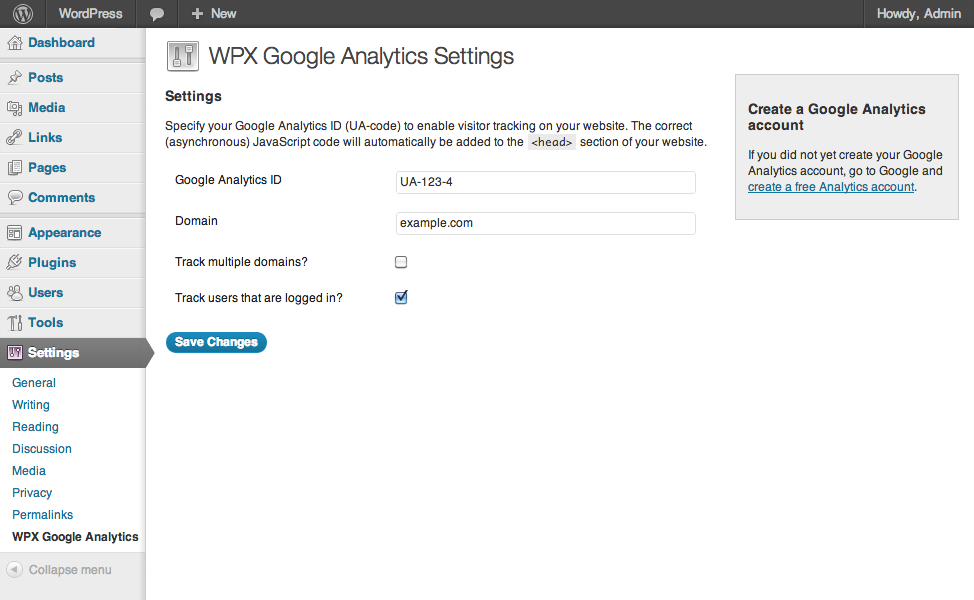
انسٹالیشن
- Upload
wpx-google-analytics.phpto the/wp-content/plugins/directory - Activate the plugin through the ‘Plugins’ menu in WordPress
- Go to
Settings>WPX Google Analyticsand paste in your analytics ID
جائزے
There are no reviews for this plugin.
شراکت دار اور ڈیویلپرز
“WPX Google Analytics” اوپن سورس سافٹ ویئر ہے۔ مندرجہ ذیل لوگوں نے اس پلگ ان میں حصہ لیا:
شراکت دار
“WPX Google Analytics” کا اپنی زبان میں ترجمہ کریں۔
ڈویلپمینٹ میں دلچسپی ہے؟
کوڈ براؤز کریں، ایس این وی ریپوزیٹری کو چیک کریں یا ڈویلپمینٹ لاگ کو سبسکرائب کریں بذریعہ آر ایس ایس۔
چینج لاگ
1.1
- Language support added
1.0.2
- Cleaned up the code, removed debug statements that caused issues on certain installations.
1.0.1
- Added: Forbidden characters are stripped from the domain.
1.0
- First public release of the plugin.