
تفصیل
View WPListCal plugin information using the JSON API plugin with this simple WordPress plugin.
After installing and activating you can use the upcomming events in your external applications.
اسکرین شاٹس
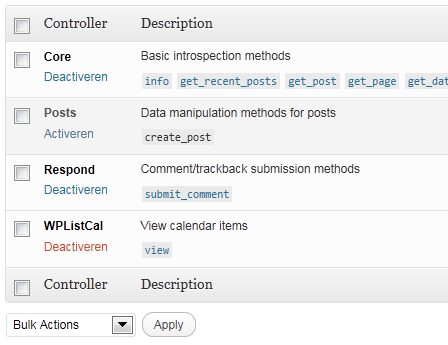
JSON API Settings: Activate WPListCal
انسٹالیشن
The automatic plugin installer should work for most people. Manual installation is easy and takes fewer than five minutes.
- Create a wplistcal-json directory in your plugins directory. Typically that’s wp-content/plugins/wplistcal-json/.
- Into this new directory upload the plugin files (wplistcal-json.php, etc.)
- Activate the plugin through the ‘Plugins’ menu in WordPress.
- Activate the ‘WPListCal’ controller through the ‘JSON API’ options page.
عمومی سوالات
- Does it work with older versions of WordPress?
-
I don’t know, try it and let me know.
جائزے
There are no reviews for this plugin.
شراکت دار اور ڈیویلپرز

“WPListCal JSON” کا اپنی زبان میں ترجمہ کریں۔
ڈویلپمینٹ میں دلچسپی ہے؟
کوڈ براؤز کریں، ایس این وی ریپوزیٹری کو چیک کریں یا ڈویلپمینٹ لاگ کو سبسکرائب کریں بذریعہ آر ایس ایس۔
چینج لاگ
1.1
- Bugfix: Sorting results
1.0
- Initial release