تفصیل
This plugins aims to provides widgets that make your discourse forum more visible in your wordpress website.
Getting started
In order to retrieve data from your discouerse instance, all you need to do is going to Appearance->Widget, add the widget named "Discourse Widget”, then specify the URL of your discourse website. You can also choose whether to display top topics or latest topics.
اسکرین شاٹس

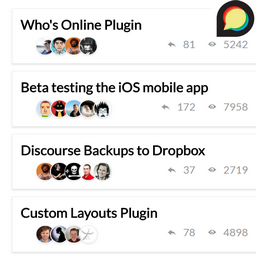
This screenshot is a demo of the plugin on the frontend
انسٹالیشن
- Upload the plugin files to the
/wp-content/plugins/discourse-widgetdirectory, or install the plugin through the WordPress plugins screen directly. - Activate the plugin through the ‘Plugins’ screen in WordPress
- Go to Appearance->Widgets, then add "Discourse Widget”
- Specify the URL of your Discourse website as well as the title of your widget
عمومی سوالات
- Installation Instructions
-
- Upload the plugin files to the
/wp-content/plugins/discourse-widgetdirectory, or install the plugin through the WordPress plugins screen directly. - Activate the plugin through the ‘Plugins’ screen in WordPress
- Go to Appearance->Widgets, then add "Discourse Widget”
- Specify the URL of your Discourse website as well as the title of your widget
- Upload the plugin files to the

شراکت دار اور ڈیویلپرز
“Discourse Widgets” اوپن سورس سافٹ ویئر ہے۔ مندرجہ ذیل لوگوں نے اس پلگ ان میں حصہ لیا:
شراکت دار
“Discourse Widgets” کا اپنی زبان میں ترجمہ کریں۔
ڈویلپمینٹ میں دلچسپی ہے؟
کوڈ براؤز کریں، ایس این وی ریپوزیٹری کو چیک کریں یا ڈویلپمینٹ لاگ کو سبسکرائب کریں بذریعہ آر ایس ایس۔
چینج لاگ
0.2
- Code Refactoring
0.1
- Initial version