

تفصیل
Preview AI is an AI-powered Virtual Try-On plugin for WooCommerce. Shoppers upload a photo and instantly see how a product looks on them — right on the product page, without leaving your store 👕✨
Customers who use virtual try-on convert at 3× the rate of those who don’t.
- 📈 3× higher conversion — shoppers who try on buy more
- 🔄 Fewer returns — expectations match reality before checkout
- ⏱️ More time on site — customers stay longer exploring products
- 💰 Higher average order value — confidence drives bigger carts
Try it yourself on the live demo
Why it works
Most fashion shoppers hesitate not because of price, but because they can’t picture themselves in the product. Preview AI removes that friction at the most critical moment — the product page.
With a simple "Virtual Try-On” button, shoppers upload a photo and get a realistic AI-generated preview in seconds. No apps to install, no disruption to the checkout flow.
Benefits for merchants
- 🎨 Fully customize the button (color, text, shape, position)
- ⚡ Zero performance impact — AI runs on external infrastructure
- 📊 Built-in analytics to measure try-on impact on sales
- 🔌 Works with WooCommerce hooks, shortcode, or Elementor widget
Analytics & conversion tracking 📊
Preview AI includes an analytics panel designed to help merchants measure real impact.
Track:
* How many shoppers use the Virtual Try-On feature
* How many previews are successfully generated
* Conversion performance of users who interacted with Virtual Try-On
* Feature adoption across your product catalog
This allows you to understand not just usage, but how Virtual Try-On contributes to conversions — helping you optimize product pages and justify ROI.
Fully customizable & theme-friendly 🎨
Preview AI is designed to work seamlessly with any WooCommerce theme.
Customize:
* Button color and styling to match your brand
* Button text and labels
* Button position on the product page
* Placement via WooCommerce hooks, shortcode, or Elementor widget
You can start with the default setup and progressively customize the experience without touching code.
Features
– AI-powered virtual try-on from a single photo
– Supports:
– Upper-body garments (t-shirts, shirts, jackets, hoodies)
– Lower-body garments (pants, skirts)
– Dresses and full-body outfits
– Shoes
– Virtual Try-On button on WooCommerce product pages
– Elementor widget + shortcode support
– Customizable button (color, text, position)
– Analytics dashboard with usage & conversion insights
– Automatic product type classification
– Mobile-first, responsive design
– Performance-friendly external AI architecture
External Service Disclosure
This plugin connects to an external service operated by Preview AI.
Service Provider: Preview AI
Service URL: https://previewai.app
Terms of Service: https://www.previewai.app/terms/terms-and-conditions
Privacy Policy: https://www.previewai.app/terms/privacy-policy
Data transmitted to the service:
- Virtual try-on generation — Product images and a customer-uploaded photo are sent to generate the try-on preview. Customer photos are processed in real time and are not stored permanently.
- Conversion attribution (opt-in) — When enabled in Settings > General > Advanced Analytics, anonymized order metadata (order ID, order total, currency, and product IDs) is sent when an order is completed or refunded to measure the impact of virtual try-on on sales. This feature is disabled by default and requires explicit activation by the store administrator. No customer personal data (name, email, address, or IP) is transmitted.
All communication is authenticated via the store’s API key and transmitted over HTTPS. A free usage tier is included so the plugin is functional immediately after activation.
Compatibility
– WooCommerce: Optimized for current versions
– Elementor: Includes a widget for custom product templates
– Themes: Compatible with Astra, Hello Elementor, OceanWP, and most WooCommerce themes
– Responsive across all modern devices
اسکرین شاٹس
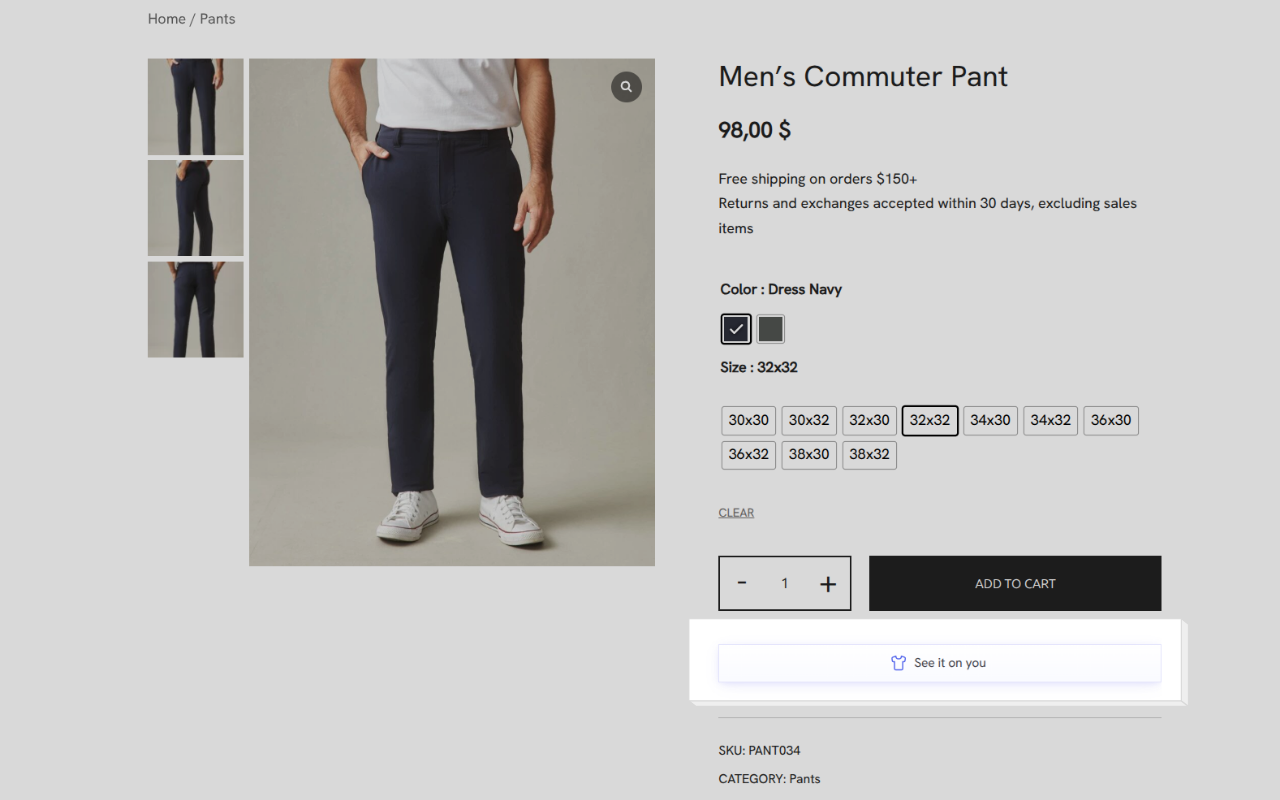
Virtual Try-On button on the product page 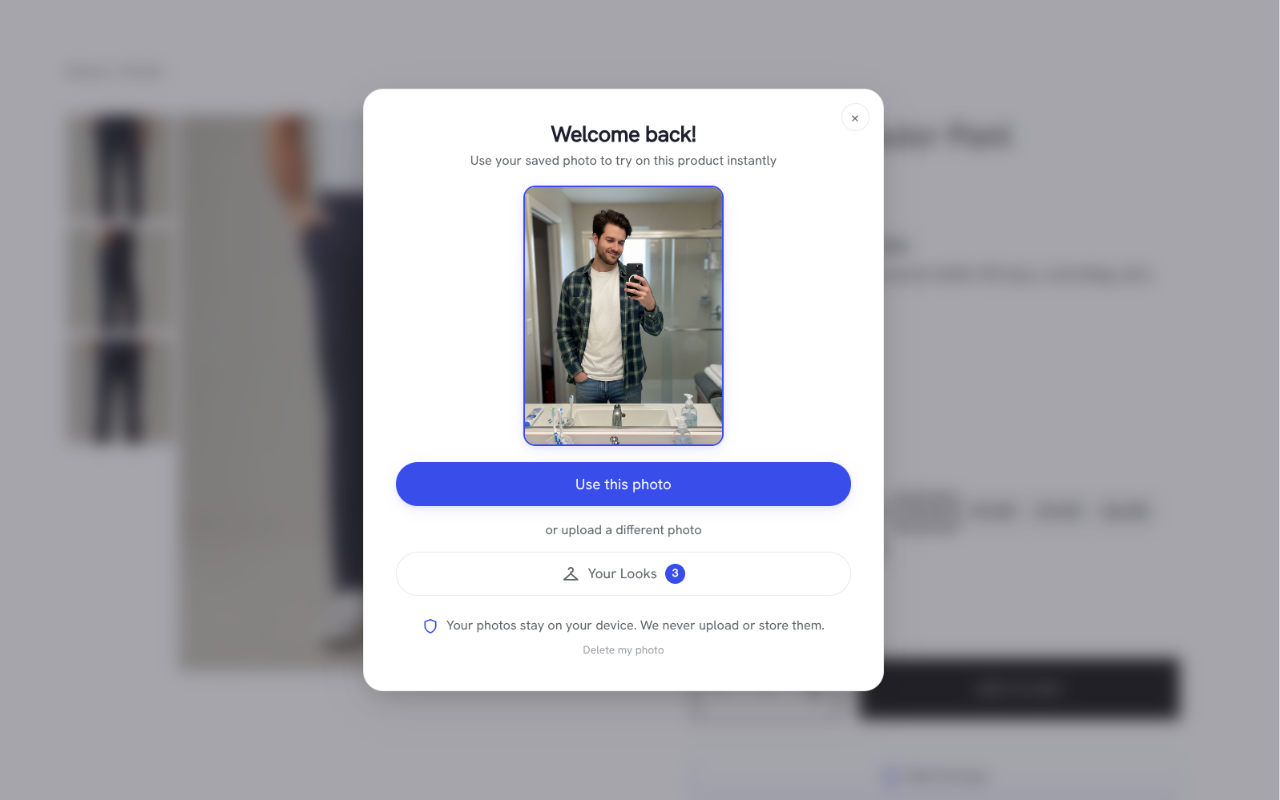
AI virtual try-on generation flow 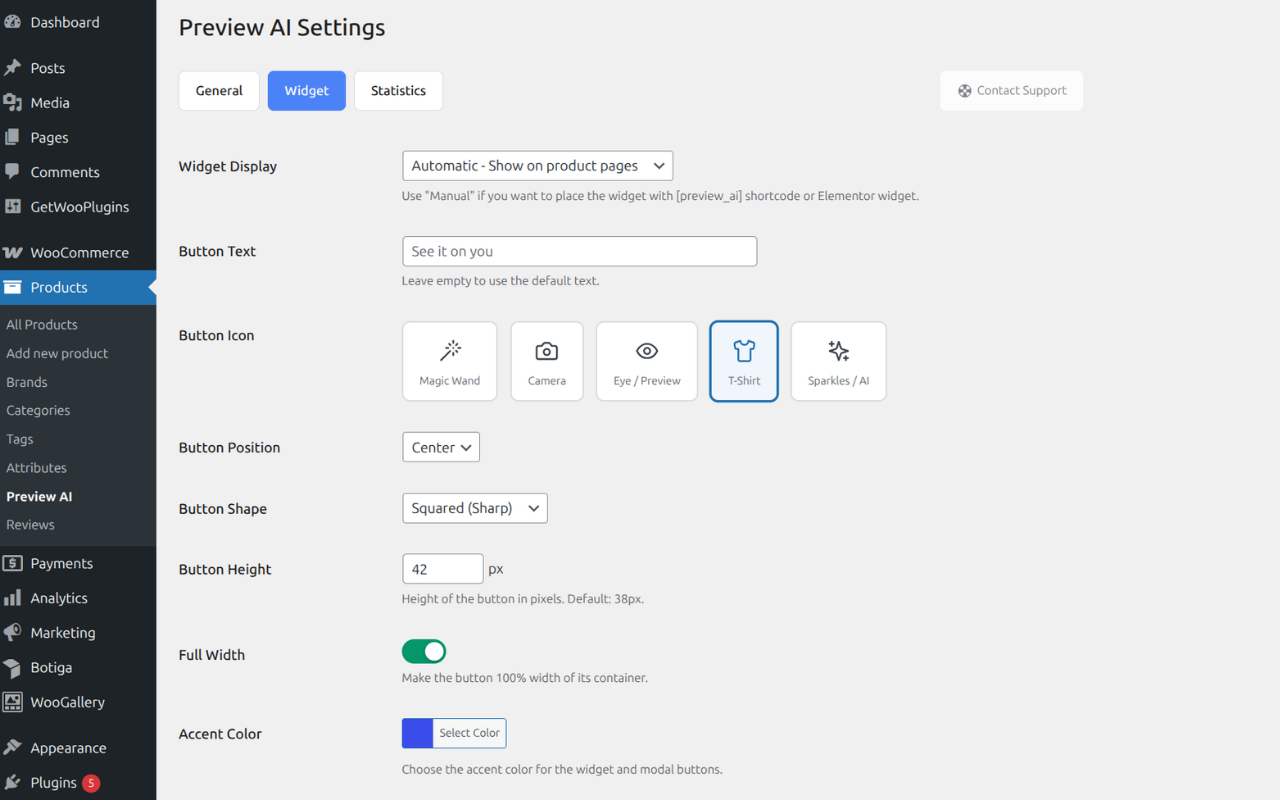
Admin settings and analytics overview
انسٹالیشن
- Upload the
preview-aifolder to the/wp-content/plugins/directory - Activate the plugin from the WordPress Plugins menu
- Complete the onboarding wizard to connect your store
- The Virtual Try-On button appears automatically on supported products
عمومی سوالات
-
Is the plugin free?
-
Yes.
The plugin is free and includes a free tier of the Preview AI service.Optional paid plans are available for stores with higher usage needs.
-
Why does it use an external service?
-
AI image generation requires specialized infrastructure that typical web hosting environments do not provide.
Using an external service allows Preview AI to deliver better results without affecting your site’s performance.
-
Are customer photos stored?
-
Customer images are processed in real time to generate the try-on preview.
They are not stored permanently and are handled according to the Preview AI privacy policy.
-
Which products are supported?
-
Preview AI currently supports:
– Tops
– Bottoms
– Dresses and full outfits
– Shoes

شراکت دار اور ڈیویلپرز
“Virtual Try-On for WooCommerce – Preview AI” اوپن سورس سافٹ ویئر ہے۔ مندرجہ ذیل لوگوں نے اس پلگ ان میں حصہ لیا:
شراکت دار
“Virtual Try-On for WooCommerce – Preview AI” کا 2 زبانوں میں ترجمہ کیا گیا ہے۔ تعاون کے لیے مترجمین کا شکریہ۔
“Virtual Try-On for WooCommerce – Preview AI” کا اپنی زبان میں ترجمہ کریں۔
ڈویلپمینٹ میں دلچسپی ہے؟
کوڈ براؤز کریں، ایس این وی ریپوزیٹری کو چیک کریں یا ڈویلپمینٹ لاگ کو سبسکرائب کریں بذریعہ آر ایس ایس۔
چینج لاگ
1.5.0
– New top-level "Preview AI” menu with dedicated subpages: General, Widget, Statistics, and Products.
– Added category-based product control: enable or disable Preview AI for entire categories at once.
– New Products page with category manager and bulk actions guide.
1.4.1
– Fixed expired try-on images: saved looks now auto-refresh their signed URLs instead of showing broken images after 7 days.
1.4.0
– Stable release. Sends the WordPress site locale on registration so the Preview AI service can align transactional emails with the store language.
1.3.2
– Added smart plan recommendation: the settings page now shows a contextual upgrade suggestion when your monthly previews are running low, so your customers never miss a try-on.
1.3.1
– Fixed widget visibility: the try-on button no longer disappears due to account status changes. Errors are shown at generation time instead.
1.3.0
– Added automatic product analysis on publish: Preview AI now activates automatically for supported products when they are first published.
– Improved onboarding experience by reducing manual steps for new products.
1.2.1
– Renamed plugin to "Virtual Try-On for WooCommerce – Preview AI”
– Added WooCommerce as a required plugin dependency (Requires Plugins header)
– Added optional deactivation feedback survey to help us improve the plugin
1.2.0
– Added optional Advanced Analytics (opt-in): link try-on usage to purchases for accurate ROI measurement.
– Session attribution: each virtual try-on session can be tracked end-to-end, from preview to checkout.
1.1.1
– Fixed nonce validation failing on sites with page caching (WP Rocket, LiteSpeed Cache, W3 Total Cache, etc.), which caused "Something went wrong” errors on every try-on request.
1.1.0
– Added Bulk Actions to enable or disable Preview AI for multiple products at once.
– Added filtering by Preview AI status (Active, Disabled, Not Analyzed, Not Supported) in the product list.
– Added sorting capability for the Preview AI column in the product list.
– Improved scalability for large catalogs using background processing for bulk activation.
1.0.4
– Added full internationalization support (i18n)
– Complete translation catalog (.pot) with 130+ translatable strings
– Improved pose validation feedback messages
1.0.2
– Added weekly preview limit per visitor (configurable in Settings > General)
– Default limit: 8 previews per visitor per week
1.0.1
– Updated plugin name to "Virtual Try-On for WooCommerce – Preview AI”
1.0.0
– Initial release
– AI virtual try-on for WooCommerce
– Elementor and WooCommerce integration
– Basic analytics and email capture