

تفصیل
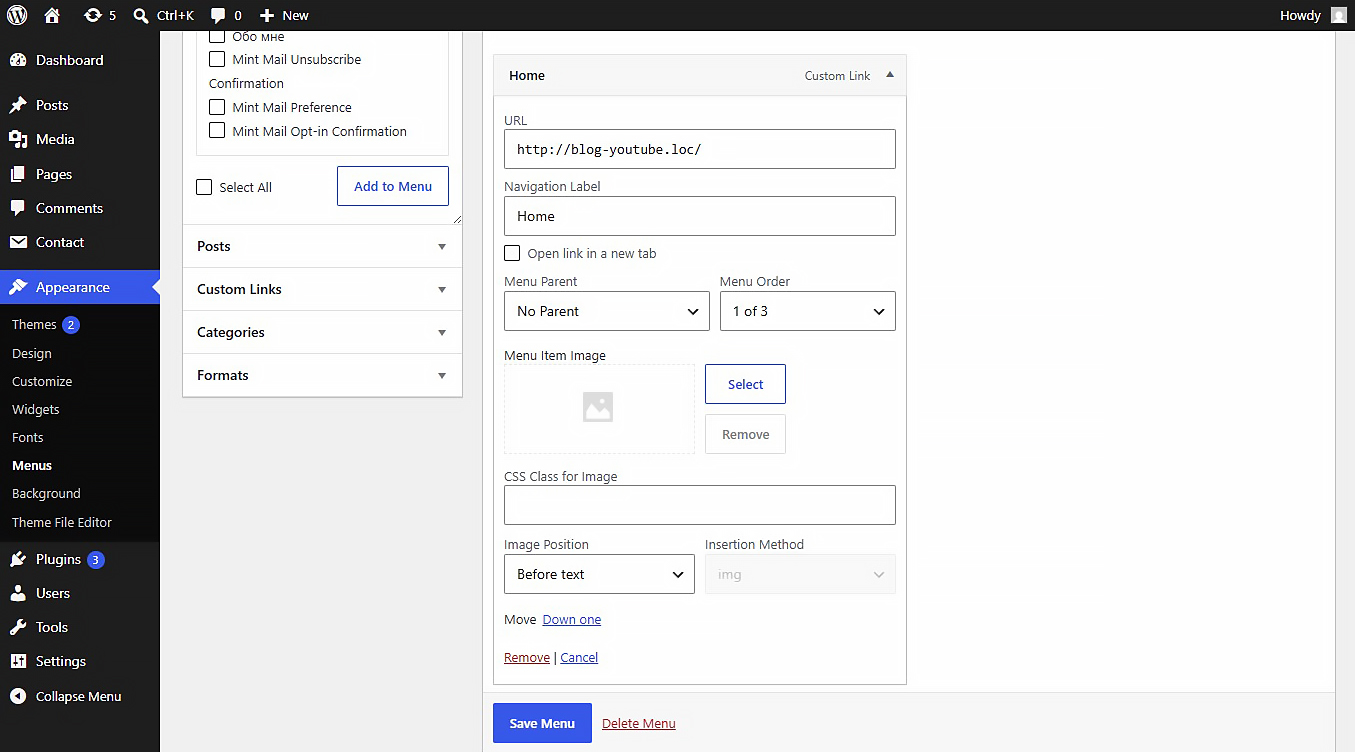
This plugin allows you to upload or link images (JPEG, PNG, WebP, SVG, etc.) directly inside the WordPress Customizer or Appearance > Menus panel. Includes built-in SVG sanitization for secure inline SVG injection.
Settings
After activating the plugin, navigate to Settings Media in your WordPress admin dashboard. There you will find the "NaviPix Settings” section where you can disable SVG upload support and SVG sanitization if needed. This gives you full control over whether the plugin handles SVG files or leaves them to your theme or other plugins.
اسکرین شاٹس
انسٹالیشن
- Upload the plugin folder to the
/wp-content/plugins/directory. - Activate the plugin through the ‘Plugins’ menu in WordPress.
- Go to Appearance > Menus, open any menu item, and choose your image.
جائزے
There are no reviews for this plugin.
شراکت دار اور ڈیویلپرز

“NaviPix” کا 1 زبان میں ترجمہ کیا گیا ہے۔ تعاون کے لیے مترجمین کا شکریہ۔
“NaviPix” کا اپنی زبان میں ترجمہ کریں۔
ڈویلپمینٹ میں دلچسپی ہے؟
کوڈ براؤز کریں، ایس این وی ریپوزیٹری کو چیک کریں یا ڈویلپمینٹ لاگ کو سبسکرائب کریں بذریعہ آر ایس ایس۔
چینج لاگ
1.0.0
- Initial release.