
تفصیل
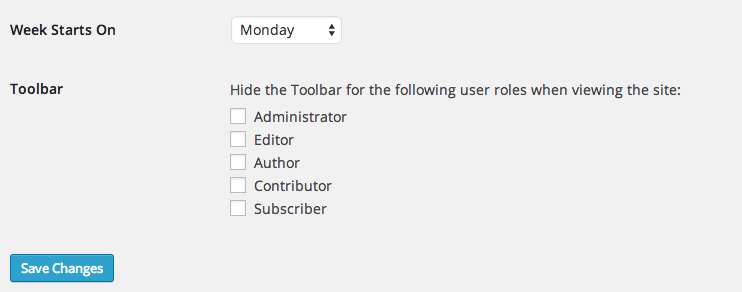
This humble plugin adds an option in Settings > General that controls who sees the WP Toolbar when viewing your site.
You can turn the Toolbar on or off per user role.
Note that this controls the public, front-end version of your site. When viewing the dashboard, the toolbar always appears.
How is this different from other plugins that do similar things? It’s smaller, cleaner, and doesn’t add any unnecesary settings pages. It’s also smart enough to hide the Toolbar option on user profiles if that user is already restricted from seeing the toolbar.
اسکرین شاٹس
انسٹالیشن
Automatic Install
- Log into your WordPress dashboard and go to Plugins → Add New
- Search for "Disable Toolbar”
- Click "Install Now” under the Disable Toolbar plugin
- Click "Activate Now”
Manual Install
- Download the plugin from the download button on this page
- Unzip the file, and upload the resulting
disable-toolbarfolder to your/wp-content/pluginsdirectory - Log into your WordPress dashboard and go to Plugins
- Click "Activate” under the Disable Toolbar plugin
عمومی سوالات
- Installation Instructions
-
Automatic Install
- Log into your WordPress dashboard and go to Plugins → Add New
- Search for "Disable Toolbar”
- Click "Install Now” under the Disable Toolbar plugin
- Click "Activate Now”
Manual Install
- Download the plugin from the download button on this page
- Unzip the file, and upload the resulting
disable-toolbarfolder to your/wp-content/pluginsdirectory - Log into your WordPress dashboard and go to Plugins
- Click "Activate” under the Disable Toolbar plugin
جائزے


شراکت دار اور ڈیویلپرز
“Disable Toolbar” اوپن سورس سافٹ ویئر ہے۔ مندرجہ ذیل لوگوں نے اس پلگ ان میں حصہ لیا:
شراکت دار
“Disable Toolbar” کا اپنی زبان میں ترجمہ کریں۔
ڈویلپمینٹ میں دلچسپی ہے؟
کوڈ براؤز کریں، ایس این وی ریپوزیٹری کو چیک کریں یا ڈویلپمینٹ لاگ کو سبسکرائب کریں بذریعہ آر ایس ایس۔
چینج لاگ
1.0
- Initial release.