
تفصیل
Conditional Menus is a simple yet useful WordPress plugin by Themify, which allows you to swap the menus in the theme as per specific conditions. In short, you can have different menus in different posts, pages, categories, archive pages, etc. It works with any WordPress theme that uses the standard WordPress menu function.
How to use it
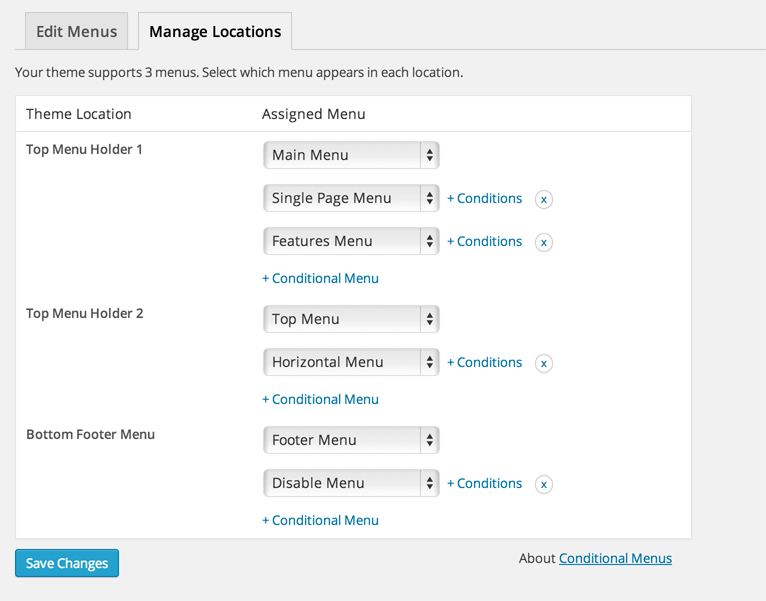
Once you activate the plugin, you will see the conditional menus on the Manage Locations tab located in your WP Admin > Appearance > Menus page.
1) To add conditional menu: click "Conditional Menu” and select a menu from the list (you can create these menus in the "Edit Menus” tab)
– You can remove the menu by selecting "Disable Menu” from the list.
2) Click on “+ Conditions” to add conditions in the modal box (tick the checkboxes where you want the menu to appear)
3) To remove the conditional menus, click on the "X” button
Visit https://themify.me/conditional-menus for more details.
اسکرین شاٹس
انسٹالیشن
- Login to your wp-admin > go to Plugins > Add New and upload the ‘conditional-menus.zip’
- Activate the plugin
جائزے


شراکت دار اور ڈیویلپرز
“Conditional Menus” اوپن سورس سافٹ ویئر ہے۔ مندرجہ ذیل لوگوں نے اس پلگ ان میں حصہ لیا:
شراکت دار
“Conditional Menus” کا اپنی زبان میں ترجمہ کریں۔
ڈویلپمینٹ میں دلچسپی ہے؟
کوڈ براؤز کریں، ایس این وی ریپوزیٹری کو چیک کریں یا ڈویلپمینٹ لاگ کو سبسکرائب کریں بذریعہ آر ایس ایس۔
چینج لاگ
The changelog is located at: https://themify.org/changelogs/conditional-menus.txt