
تفصیل
If you need paid support to have this plugin installed or need to have a customized version please send an email to support@wordpressforge.com.
Simple, if you use this plugin, rel="nofollow" will be inserted automatically for all the external links on your wordpress posts or pages.
Feature
- Adds
rel="nofollow"to all external links in your wordpress posts/pages - Will not add
rel="nofollow"to any of the internal links of your wordpress posts/pages. - Will not add another
rel="nofollow"to links that already haverel=nofollow - Will remove existing
dofollowfromrel=""if it exists within the link
You can visit our blog blog.wordpressforge.com
Support
Donations
Are always welcome 😉
اسکرین شاٹس
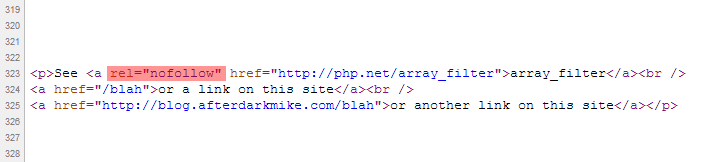
rel="nofollow" tag is inserted into all the external links.انسٹالیشن
- Download the latest zip file and extract the ‘wpf-force-external-nofollow’ directory.
- Upload it to your ‘/wp-content/plugins/’ directory.
- Activate ‘WPF Force External Nofollow’ in the ‘Plugins’ menu in WordPress.
جائزے
There are no reviews for this plugin.
شراکت دار اور ڈیویلپرز
“WPF Force External Nofollow” اوپن سورس سافٹ ویئر ہے۔ مندرجہ ذیل لوگوں نے اس پلگ ان میں حصہ لیا:
شراکت دار
“WPF Force External Nofollow” کا اپنی زبان میں ترجمہ کریں۔
ڈویلپمینٹ میں دلچسپی ہے؟
کوڈ براؤز کریں، ایس این وی ریپوزیٹری کو چیک کریں یا ڈویلپمینٹ لاگ کو سبسکرائب کریں بذریعہ آر ایس ایس۔
چینج لاگ
1.3
- Fixed readme.txt wording
1.2
- Fixed Typo
1.0
- First released version.