
تفصیل
This plugin lets you increase or decrease paragraph indentation by pressing Tab or Shift+Tab in the Gutenberg editor.
From version 1.1.0, indentation inside the editor is represented by a simple <tab> × N badge — ensuring clean, theme-independent preview — while the actual indentation remains visible on the front end.
FAQ Check on the site.
https://it-libero.com/en/en-us/download/indent-paragraph-with-tab/
Settings
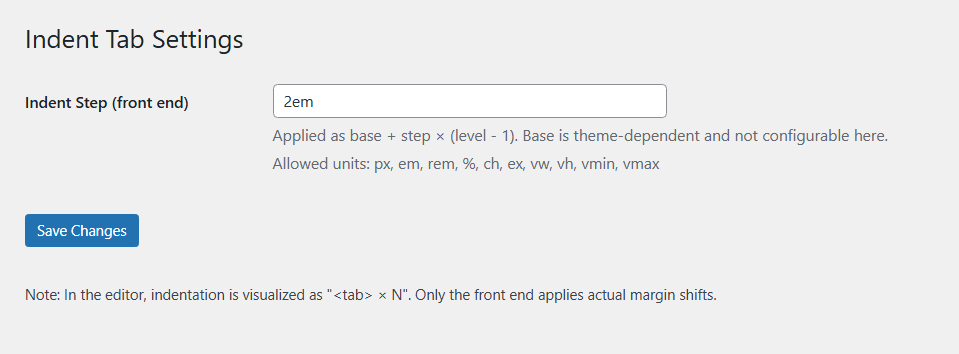
You can change the indentation value.
1. Admin Settings > Indent Tab
2. Indent Step input
اسکرین شاٹس
جائزے
There are no reviews for this plugin.
شراکت دار اور ڈیویلپرز
“Indent Paragraph with Tab” اوپن سورس سافٹ ویئر ہے۔ مندرجہ ذیل لوگوں نے اس پلگ ان میں حصہ لیا:
شراکت دار
“Indent Paragraph with Tab” کا اپنی زبان میں ترجمہ کریں۔
ڈویلپمینٹ میں دلچسپی ہے؟
کوڈ براؤز کریں، ایس این وی ریپوزیٹری کو چیک کریں یا ڈویلپمینٹ لاگ کو سبسکرائب کریں بذریعہ آر ایس ایس۔
چینج لاگ
1.1.1
- Security: added sanitize_callback for options (
ipwt_base,ipwt_step) with a strict CSS unit whitelist. - Hardening: inline CSS now uses validated values only; invalid input is discarded.
- Admin UI: clarified settings descriptions and documented allowed units.
1.1.0
- Added visual
<tab> × Nbadge preview in editor. - Removed editor-side indentation shifting to avoid theme conflicts.
- Front-end rendering unchanged.
1.0.1
- Initial stable release.