
تفصیل
Display "Badges” in the side-panel which points to a web-site and an image which is then used to build the "badge”.
To access the configuration you have to go to Appearance > Widgets and edit the settings in the Panel.
Using the Widget you can choose whether to:
- (Optionally) display a Title
- Link to a site
- Required link to an image to mark that site (any size will work, but the "standard” seems to be 88 pixels wide by 31 pixels high)
- Pad the Badge (including centring the text); some people may prefer using their own CSS, so this is an optional configuration.
- Enable "Display Badge in a Box” (enabled by default)
- Enable the Displaying of a Drop-Shadow
If more control is needed, or more badges need to be displayed, the badges plugin on the WordPress site might be a better fit.
اسکرین شاٹس
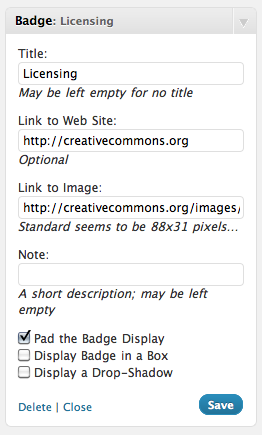
Create a "Licensing” badge that points to the Creative Commons website and uses a CC 88×31 banner 
The result of the configuration in No 1 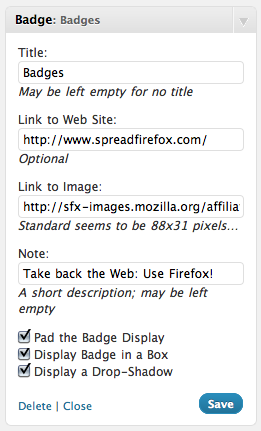
Boxing a Badge to SpreadFirefox with an added drop-shadow 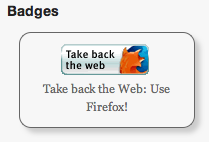
The resultant Badge
انسٹالیشن
Install
- Unzip the
badges.zipfile. - Upload
badges.phpto the/wp-content/plugins/directory. - Activate the plugin through the ‘Plugins’ menu in WordPress.
- Use the "Badges” widget.
Upgrade
- Follow your normal installation process
- Open the Widget Control Panel for "Badges” and confirm settings.
- Sit back and enjoy…
Use the WordPress Plug-in System
- Select "Upgrade and Activate”
- Congratulate yourself on a sterling job.
عمومی سوالات
-
How do I style the badges using CSS?
-
Quite simply by using the
div.badgeclass. -
How do I style a single badge?
-
Every badge gets a unique ID generated by the plug-in based on the plug-in’s name and the badge’s container ID. This will likely look something like "inner-badge-[NUMBER]”.
جائزے
There are no reviews for this plugin.
شراکت دار اور ڈیویلپرز

“Badge” کا اپنی زبان میں ترجمہ کریں۔
ڈویلپمینٹ میں دلچسپی ہے؟
کوڈ براؤز کریں، ایس این وی ریپوزیٹری کو چیک کریں یا ڈویلپمینٹ لاگ کو سبسکرائب کریں بذریعہ آر ایس ایس۔
چینج لاگ
1.5
- Very minor update to update the links to my blog
- Tested up to WordPress 5.2.3
1.1
- Minor update to add an "id” selector to the displayed badges
1.0
- Initial Public Release