
تفصیل
Have you ever been in situation where you publish post. But displayed in wrong location due to forgot setting the right tags / categories.
Or, broken blog layout because of forgot to setting featured images.
Don’t worry, this plugin will help you remember that. You could also set custom warning messages to your like.
اسکرین شاٹس
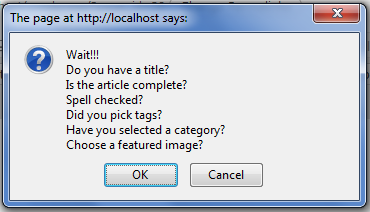
This is what you’ll see whenever you push the publish button 
This is where admin setting located 
Input your custom messages here
انسٹالیشن
- Upload
crpostwarningdirectory to the/wp-content/plugins/directory - Activate the plugin through the ‘Plugins’ menu in WordPress
- Go to Settings »
[CR]Post Warningand set your warning messages
عمومی سوالات
- What is the minimum PHP requirement?
-
For the plugin itself, PHP4 and JAVASCRIPT activated. Right, you need javascript to be able to use this plugin.
جائزے
There are no reviews for this plugin.
شراکت دار اور ڈیویلپرز
“[CR]PostWarning” اوپن سورس سافٹ ویئر ہے۔ مندرجہ ذیل لوگوں نے اس پلگ ان میں حصہ لیا:
شراکت دار
“[CR]PostWarning” کا اپنی زبان میں ترجمہ کریں۔
ڈویلپمینٹ میں دلچسپی ہے؟
کوڈ براؤز کریں، ایس این وی ریپوزیٹری کو چیک کریں یا ڈویلپمینٹ لاگ کو سبسکرائب کریں بذریعہ آر ایس ایس۔