
تفصیل
GCal Events List retrieves events from Google Calendar and shows data in a widget.
To make GCal Events List work properly, you have to activate the plugin and paste your Google Calendar API key and a public calendar ID in the widget admin panel.
It requires some other options. Here is the full list of params:
- Title (widget title)
- Calendar ID (you can find it in the option panel of your Google Calendar)
- Google API key
- Start from (a valid date in YYYY-MM-DD format)
- Max results
For a detailed description of calendar settings, read the Google Calendar Data API documentation
REMEMBER: your Google Calendar must be public, otherwise the widget won’t show any event!
اسکرین شاٹس
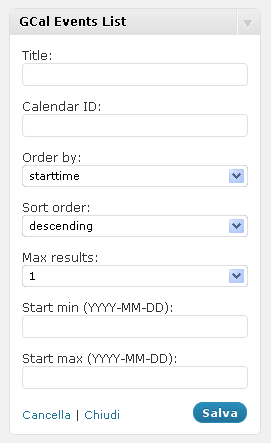
The widget admin panel 
The widget rendered in the front-end
انسٹالیشن
- Extract gcal_events_list.zip
- Upload the plugin folder to the
/wp-content/plugins/directory - Activate the plugin through the ‘Plugins’ menu in WordPress
- Configure your GCal Events List widgets through the widgets admin page.
عمومی سوالات
- Installation Instructions
-
- Extract gcal_events_list.zip
- Upload the plugin folder to the
/wp-content/plugins/directory - Activate the plugin through the ‘Plugins’ menu in WordPress
- Configure your GCal Events List widgets through the widgets admin page.
جائزے
There are no reviews for this plugin.
شراکت دار اور ڈیویلپرز
“GCal Events List” اوپن سورس سافٹ ویئر ہے۔ مندرجہ ذیل لوگوں نے اس پلگ ان میں حصہ لیا:
شراکت دار
“GCal Events List” کا اپنی زبان میں ترجمہ کریں۔
ڈویلپمینٹ میں دلچسپی ہے؟
کوڈ براؤز کریں، ایس این وی ریپوزیٹری کو چیک کریں یا ڈویلپمینٹ لاگ کو سبسکرائب کریں بذریعہ آر ایس ایس۔
چینج لاگ
2.1
- Fixes several errors
2.0
- New version release
1.1
- Minor changes
1.0
- Fix: deprecated PHP4 style constructors in WP 4.3 read more
- Upgrade: support to Google Calendar API V3
0.1
- Initial plugin release