
تفصیل
Christmas countdown clock showing days and hours until Christmas day. Select from several designs, sizes, animations and backgrounds
- Select from a range of designs
- Select size, background colours, pictures or animations
- Full range of designs can be seen at mycountdown.org
اسکرین شاٹس
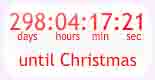


انسٹالیشن
- Download the zip file and extract the contents,
- Upload the folder
christmas-countdown-clockto your WP plugin folder/wp-content/plugins/directory, - Go to Plugins > Plugins, and activate the plugin,
- Go to Appearance > Widgets, and drag the widget to a sidebar,
- Select the countdown type, size, colors, or background from the setting menu
- Send us and email with any problems to widgets at mycountdown.org, we will make efforst to solve the problem
- Please rate our plugin!
عمومی سوالات
-
How do I customize the colours?
-
Go to the Appearance->Widgets tab in your wordpress admin panel, and click on settings for the countdown clock. Select text, border and background colors from the drop downs
-
Can I set the time of day and world timezone for the event ?
-
Yes, select from the timezone dropdown the time zone in your area
-
Yes, the javascript code is available directly from mycountdown.org/christmas. You must paste the javascript into the page editor in HTML mode.
-
Is there support ?
-
Further support is available at mycountdown.org/support
-
Email & Twitter
-
Email us to widgets at mycountdown.org or twitter.com/mycountdown

شراکت دار اور ڈیویلپرز
“Christmas Countdown Clock” اوپن سورس سافٹ ویئر ہے۔ مندرجہ ذیل لوگوں نے اس پلگ ان میں حصہ لیا:
شراکت دار
“Christmas Countdown Clock” کا اپنی زبان میں ترجمہ کریں۔
ڈویلپمینٹ میں دلچسپی ہے؟
کوڈ براؤز کریں، ایس این وی ریپوزیٹری کو چیک کریں یا ڈویلپمینٹ لاگ کو سبسکرائب کریں بذریعہ آر ایس ایس۔
چینج لاگ
1.1
- Released 08/03/2011
- Upgraded with timezone option
1.0
- Released 03/09/2010
- First release