

تفصیل
BuddyPress activity updates are where your community talks, but they stay inside your site. This plugin adds a Share button next to Comment and Favorite on each activity item. One click opens a row of network icons, and the update goes out with its link back to your site.
What it does
- Adds a Share button to activity items in the activity stream, on member profiles and in groups. Logged-in members see the button; visitors do not.
- Supports Facebook, X (Twitter), LinkedIn, Pinterest, WhatsApp, email, Reddit, WordPress and Pocket.
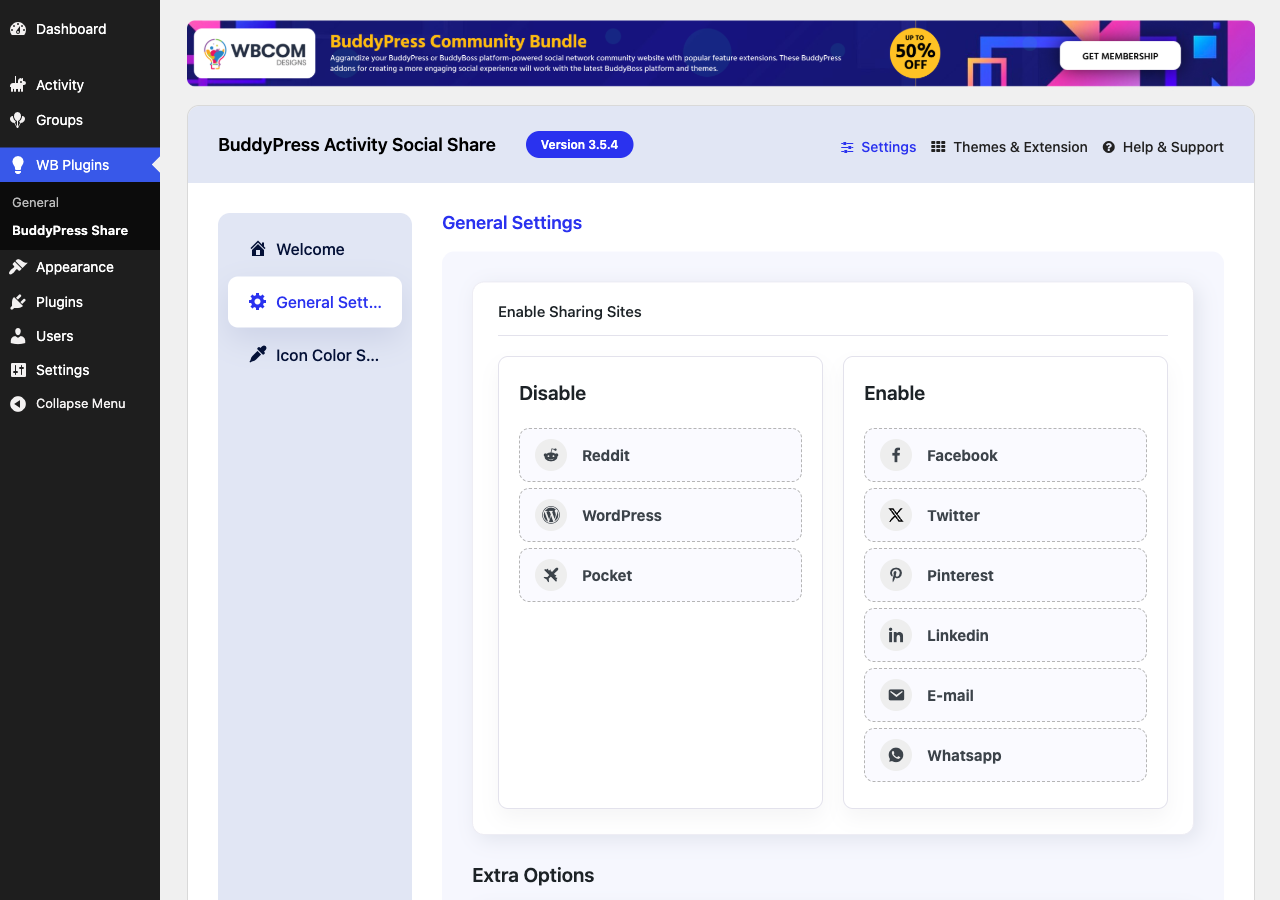
- Choose which networks appear: drag them between the Enable and Disable lists in the settings.
- Set the icon color for each network.
- Opens each network in a popup window, or in a new tab if you turn the popup off. WhatsApp and email always use their own app.
- Adds Open Graph tags to single activity pages, so shared links show a title, description and image.
- Works with BuddyPress and the BuddyBoss Platform.
Getting started
- Install and activate BuddyPress, then this plugin.
- Go to WB Plugins > BuddyPress Share > General Settings.
- Drag the networks you want into the Enable list, and the ones you do not want into the Disable list.
- Optional: set icon colors under Icon Color Settings.
Need help? Read the documentation or contact Wbcom Designs support.
More from Wbcom Designs
- BuddyX – free community theme for BuddyPress and BuddyBoss sites.
- BuddyNext – a complete community platform for WordPress.
- Jetonomy – modern discussion forums for WordPress.
- WB Gamification – points, badges and leaderboards for your members.
اسکرین شاٹس


انسٹالیشن
- In your WordPress admin, go to Plugins > Add New and search for "BuddyPress Activity Social Share”.
- Click Install Now, then Activate. BuddyPress must be active.
- Go to WB Plugins > BuddyPress Share to choose your networks.
عمومی سوالات
-
Does it need BuddyPress?
-
Yes. It needs BuddyPress with the Activity Streams component turned on, or the BuddyBoss Platform.
-
Logged-in members. It shows on every activity item they can see. Visitors who are not logged in do not get the button, but links that members share open normally for anyone.
-
How do I remove a network?
-
Go to WB Plugins > BuddyPress Share > General Settings and drag the network from the Enable list to the Disable list. The change saves straight away.
-
Can I open networks in a new tab instead of a popup?
-
Yes. Turn off "Open as popup window” under Extra Options on the General Settings tab.
-
Social networks cache link previews. After you change a post, ask the network to fetch the link again, for example with the Facebook Sharing Debugger.
-
Where do I get support?
-
Post in the WordPress.org support forum for this plugin, or contact Wbcom Designs support.
جائزے


شراکت دار اور ڈیویلپرز
“Wbcom Designs – BuddyPress Activity Social Share” اوپن سورس سافٹ ویئر ہے۔ مندرجہ ذیل لوگوں نے اس پلگ ان میں حصہ لیا:
شراکت دار

“Wbcom Designs – BuddyPress Activity Social Share” کا اپنی زبان میں ترجمہ کریں۔
ڈویلپمینٹ میں دلچسپی ہے؟
کوڈ براؤز کریں، ایس این وی ریپوزیٹری کو چیک کریں یا ڈویلپمینٹ لاگ کو سبسکرائب کریں بذریعہ آر ایس ایس۔
چینج لاگ
3.5.4
- Fixed warnings and potential fatal errors in plugin functions to ensure stability.
- Excluded WhatsApp and Email services from popup behavior for improved user experience.
- Set default enabled services to Facebook, Twitter, LinkedIn, Email, and WhatsApp.
- Enhanced Email and WhatsApp sharing links with dynamic site title and URL for better personalization.
- Fixed issue with activity share icons not displaying correctly.
- Fixed icon color settings tab responsiveness on mobile devices.
- Managed Twitter icon color with backend settings.
- Resolved deprecated warnings for compatibility with the latest standards.
- Improved backend options responsiveness for better usability.
3.5.3
- Fix: Compatibility check with WordPress 6.5.0
3.5.2
- Fix: (#142) Fixed update twitter icon
- Fix: (#143) Fixed issue with bb platform pro reaction
- Fix: (#144) Fixed issue with mail share
3.5.1
- Fix: removed unused actions
3.5.0
- Fixed: CSRF vulnerability
3.4.0
- Fixed: (#111) Added Yozify media support for og meta
- Fixed: Fixed php fatal error on plugin activation
- Fixed: (#122) Icon Color Settings UI
- Fixed: Update color setting tab icon
- Fixed: Added color library and icon color default option
3.3.1
- Fixed: Updated Admin wrapper
3.3.0
- Fix: (#87) Hide copy option in social sites dropdown
- Fix: PHPCS fixes
3.2.1
- Fix: PHPCS fixes
3.2.0
- Fix: Install Free plugin from WordPress Wrapper
3.1.0
- Fix: (#80) Removed unnecessary inline-style
- Fix: (#80) Update backend UI and remove unnecessary inline-style
- Fix: (#79) Fixed hide share button if services are not enabled
- Fix: (#78) Fixed plugin redirect to page and display error
- Fix: (#71) Managed share button UI with Kleo
- Fix: Fixed adding new social links and sortable links
- Fix: Implemented sortable social links functionality
3.0.0
- Fix: Updated backend UI
2.9.1
- Fix – Fixed social site and remove social site options
2.8.0
- Fix – Fixed missed escaping functions
- Fix – Renamed plugin Title
2.7.0
- Enhancement – Added admin option for copy activity
2.6.0
- Enhancement – #54 Added Copy to Clipboard Functionality
- Enhancement – Added Whatsapp Icon
- Fix – #68 issues with BuddyBoss Theme
2.5.0
- Enhancement – Added support for BuddyBoss Platform
- Fix – Removed default fallback to avatars
2.4.0
- Fix – Added admin notice for review
2.3.0
- Fix – update BuddyPress activation condition
2.2.1
- Fix – Removed Google+ Option as this is no longer working. #39
- Fix – Nouveau – Improve the UI of the share button. #49
2.2.0
- Fix – Removed font-awesome 5.0 #37
2.1.0
- Fix – Fixed single page error. #34
- Enhancement – Add setting for user open graph enable/disable. #35
2.0.1
- Fix – Compatibility with BuddyPress 4.3.0. #33
2.0.0
- Enhancement – Improve the Backend UI so you can manage all the wbcom plugin’s settings in one place. #31
1.2.2
- Fix – Compatibility with BuddyPress 4.1.0. #29
1.2.1
- Fix – Share on wordpress and email popup fix.
1.2.0
- Fix – BuddyPress 3.1.0 Compatible
1.1.0
- Fix – Multisite Support
1.0.7
- Fix – Enqueue position of admin css and js files
1.0.6
- Fix – Extra content display on single post pages
1.0.5
- Fixing FB shares
1.0.4
- Fixed missing thumbnail after share activity post.
- Fix – Remove the glitch by clicking the share icon.
- Enhancement – Provide a filter to change the ‘Share’ button text.
- Enhancement – Provide a filter to add new social services’ in the front end.
- Enhancement – Change the view of social share button icons.
- Enhancement – I added post content for activity sharing on Facebook and Google Plus.
1.0.3
- Fix – Translation Fixes
- Enhancement – Enable sharing for logged-out users
- Enhancement – Allow to add more social icons
1.0.2
- Third Version.
1.0.1
- Second Version.
1.0.0
- first version.
1.0.0
- JS fixes for BP 2.7.